Finance Templates for Business Owners: Which Ones to Use
By Owner Track
You have money in the bank, but payroll is Friday and you cannot say what is spendable. A short set of finance templates fixes that: a P&L, a budget, a cash flow forecast and a break-even sheet. Start with the P&L, because it feeds the rest. Owner Track builds templates for owners around exactly those jobs.
This guide covers which templates matter, what each must contain, how to check the math, and how to adapt them to your trade. It sits in the running stage of the owner life cycle. The hub for that stage is the Business Track.
Owner Track
Choose Finance Templates That Fit
Owner Track brings together practical finance templates and plain-English lessons to help you work through cash flow, profit, budgeting and break-even.
Public small business programs teach the same order. One SBDC template links a P&L to break-even, cash flow and balance sheet worksheets, and its instructions say to enter data in the P&L first because it drives the others. An SBDC is a Small Business Development Center, a local advising office funded in part by the U.S. Small Business Administration.
The formula:
Net profit = Revenue − Cost of goods sold − Operating expenses
The line owners get wrong is labor. The Georgia SBDC workbook says cost of goods sold should hold only labor directly tied to producing the product or service. Ordinary payroll and salaries go in expenses. Mix them and your gross margin is wrong, and so is your break-even.
Illustrative example: an HVAC shop, one month
Revenue: $120,000. This is invoiced work for the month.
Materials and equipment: $42,000. Direct cost of the jobs.
Field technician wages: $30,000. Direct labor belongs in COGS.
Gross profit: $48,000. Revenue minus COGS, so 40% gross margin.
Office payroll, rent, insurance, software: $34,000. These are expenses, not COGS.
Net profit: $14,000. What is left before owner pay decisions and taxes.
Put the technicians in expenses instead and gross margin jumps to 75%. That number would make you think you can discount jobs. You cannot. The Gross Margin Calculator and Profit Margin Calculator help you test the split.
The budget template
A budget is your plan for the P&L. A good one has revenue by line, direct costs, fixed expenses and a column for actuals.
The FDIC’s Money Smart for Small Business budgeting module names four core statements: balance sheet, P&L, cash flow statement and statement of owner’s equity. It also advises smoothing periodic costs. Divide an annual insurance premium by 12 and carry that amount every month.
Illustrative example: smoothing a cost
Annual premium: $9,600. The bill arrives once.
Monthly budget line: $9,600 ÷ 12 = $800. It stops the bill from wrecking one month.
The cash flow forecast
Profit is not cash. A job can be profitable and still leave you short when the customer pays in 45 days. A cash flow forecast shows the gap.
The FDIC’s Managing Cash Flows guide lays out a template with beginning cash, operating inflows and outflows, investing and financing activities, change in cash and ending cash. It tells you to enter outflows with a minus sign so the sheet treats them as negatives.
Ending cash = Beginning cash + Cash in − Cash out
The same guide teaches the cash conversion cycle, built from days inventory outstanding, days sales outstanding and days payables outstanding.
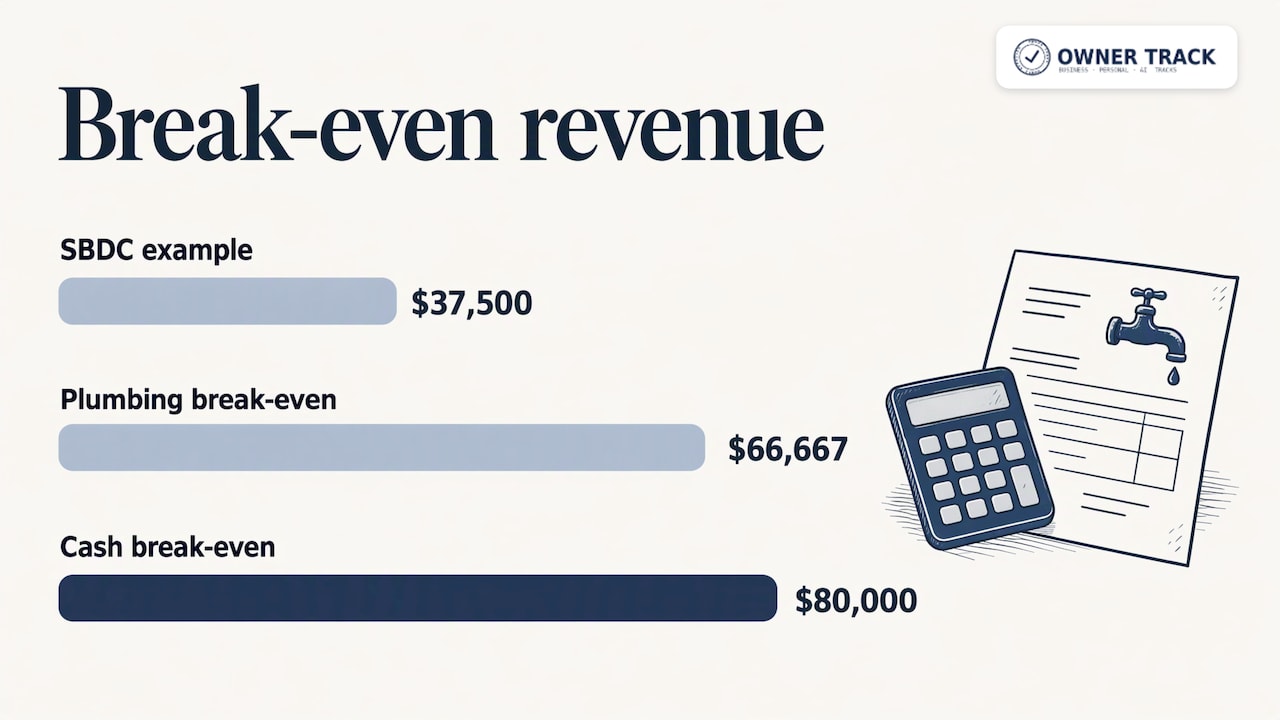
Break-even is the sales level where profit is zero. The SBDC template computes it as fixed expenses divided by contribution margin. It adds items like owner draw and loan principal for a cash break-even.
The Georgia SBDC workbook gives a clean example: $10,000 gross profit on $25,000 revenue is a 40% margin. With $15,000 of expenses, break-even revenue is $15,000 ÷ 0.40 = $37,500.
Illustrative example: a plumbing company
Fixed costs per month: $30,000. Rent, office staff, trucks, insurance.
Contribution margin: 45%. Revenue left after direct job costs.
Break-even: $30,000 ÷ 0.45 = $66,667. Below this you lose money.
Add $6,000 monthly owner draw: $36,000 ÷ 0.45 = $80,000. That is your cash break-even.
Hiring is where budgets break. The SCORE Financial Projections Guide has a payroll tab that figures Social Security, Medicare, FUTA and SUTA from wage inputs. It also gives the hourly formula:
Hourly pay = Annual salary ÷ 52 ÷ 40
For $54,000, that is $25.96 an hour. That is wages only. Your true cost per employee is higher, so run the Employee Cost Calculator. For your own pay, read Owner Pay.
Pick the template that fits your trade
Generic templates fit no business exactly. The North Coast SBDC and Solano SBDC documentation says as much and tells owners to modify them. Cells are unprotected, so formulas can get overwritten. After any structural change, re-check the totals.
A quick adaptation routine:
Rename revenue lines to match how you sell: jobs, covers, routes, visits.
Decide what counts as direct cost, and keep it consistent every month.
Add a line for each cost that surprises you, such as fuel or card fees.
Change one thing, then confirm the totals still tie.
If you are buying, selling or valuing a business, the Business Valuation Calculator gives an educational starting point. Treat it as learning, not deal advice.
Using AI with your templates
AI can speed up a review, but you own the numbers. Paste in figures with customer names and account numbers removed. Recompute any total it gives you. Ask it to list assumptions it made. Our worksheet on how to use AI to check your cash forecast walks through it. To see where AI fits in your operation, try the AI Readiness Assessment.
Most owners do not have a template problem. They have a problem that starts with the bank balance and ends with a Friday payroll they are guessing about.
We start there. Every Owner Track lesson shows the formula, then a worked example with the full statements, so you see where each number goes. Templates are the next step: they turn a lesson into a routine you can run in 20 minutes a week.
That is why our tools, templates and playbooks connect. A calculator gives a first answer. A template makes it repeatable. The Membership keeps you going from there.
What finance templates does a small business need first?
Start with a P&L and a cash flow forecast. Add a budget and a break-even sheet next. Then add a weekly review so the numbers get used.
Should I build templates in Excel or Google Sheets?
Either works. Pick the one your team will open every week. Owner Track’s budget and P&L templates are editable CSV downloads, which open in both.
How often should I update my templates?
Update cash flow weekly and the P&L monthly. Revisit the budget each quarter, or when a big cost changes.
Can a template tell me what my business is worth?
It can give a rough educational estimate from your numbers. It does not replace a formal valuation. Talk to a CPA, attorney or business broker before you buy, sell or finance anything.
Your money
Templates show what the business earns. What you take home is a separate decision. See Personal Track for building your own wealth beyond the business.
Do it faster with AI
Paste your last three months of anonymized P&L lines into an AI tool and ask it to flag any line that moved more than 15%. Then verify each flag yourself. More at the AI Track.
This article is general education. Talk to a CPA or attorney about tax, legal and insurance questions, and to a CPA, attorney or business broker before buying, selling or financing.